We first reviewed Thumbium three days after its launch, when the honest response to “ should you buy this” was “ the concept is sound, but there’s no proven track record yet.” A week has passed since then, and this Thumbium review resumes the story with the one thing that’s changed the most: the price. Front-end tiers have risen by about 48% overall since launch week, altering the calculations for anyone who waited to participate the first time. We pulled the current WarriorPlus affiliate dashboard directly, compared it line by line with our original screenshot, and this update walks you through exactly what’s changedand what still hasn’t been independently verified after a week.
Thumbium Review
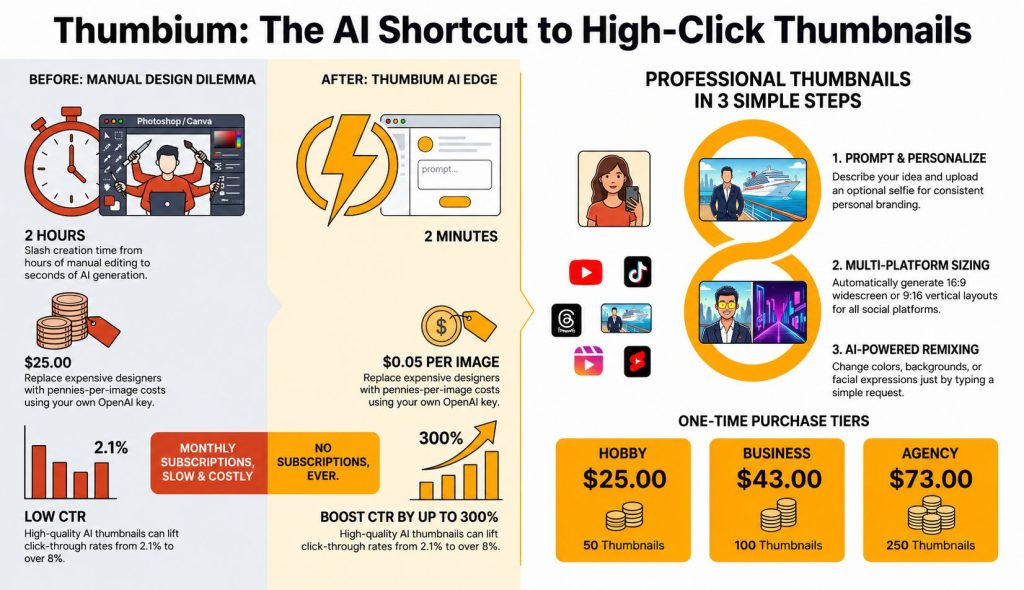
Thumbium remains a solid one-time AI thumbnail generator for YouTube creators that connects to your own OpenAI API key instead of charging a monthly subscription. The software itself hasn’t changed, but the launch pricing has. All three front-end editions increased by around 48% compared to launch week, making today’s purchase a different value proposition than early reviews reflected. If you need AI-generated thumbnails regularly, it still offers good long-term value—but it’s no longer the bargain it was at launch.
Table of Contents
What’s Actually Changed Since Launch Week
This Thumbium review exists specifically to update three things we flagged as open questions the first time around. First, and most concretely: pricing. Thumbium Hobby moved from $17 to $25, Business from $29 to $43, and Agency from $49 to $73 — each tier rose by almost exactly the same percentage, which points to a single deliberate price-tier adjustment rather than piecemeal changes. Commission stayed flat at 50%, so the dollar amount affiliates earn per sale rose right alongside the price. Second: the three OTOs — Remixer, Copywriter, and Client Review — are completely unchanged in price and commission, so whatever changed, it wasn’t the upsell structure.
Third, and more speculative: the sales page’s own meta description now advertises support for Reels and TikTok in addition to YouTube and Shorts, where launch-week copy only mentioned YouTube and Shorts. We flag that as an announced scope expansion rather than a confirmed one, since the sales page remains JS-blocked on direct fetch and we couldn’t verify what, if anything, actually changed under the hood to support the additional platforms.
To understand why this pricing change matters more than it may seem at first: a 48% increase just one week after launch represents a bigger leap than the usual WarriorPlus strategy of raising prices by $ 2 at each shopping cart threshold. It aligns more with the launch-window -closing pattern, where early-bird pricing concludes and the product transitions to its standard, regular price. If that’s accurate, the $ 17-$29-$49 pricing tiers we looked at on July 18 weren’t intended as the long-term plan they were an early-access promotion, and $25-$43-$73 might better reflect Thumbium’s likely pricing moving forward. That’s a significantly different perspective for anyone choosing whether to buy now or wishing they hadn’t waited.
It’s important to be precise about the specifics of what we can and can not confirm here. WarriorPlus vendors determine their own pricing timelines, and it’s typical on the platform for a launch price to increase after an initial period this practice is common and not inherently unusual or cause for concern. What this Thumbium review can verify directly is the before-and -after two dated screenshots from the same affiliate dashboard, taken one week apart, displaying the same three front-end products at varying prices but with identical commission rates.
There’s also a practical point worth noting for readers who purchased during launch week at the original prices of $17$29$49. This Thumbium review update indicates that earlier buyers didn’t lose out they just paid less for the same product compared to today’s purchasers. In fact, that’s the most compelling practical reason to buy early in future launches from any vendor, rather than delaying to wait for reviewsbecause waiting on this particular launch ended up costing about 48% more for essentially the same product.
🚀 Get Thumbium at the Current Price →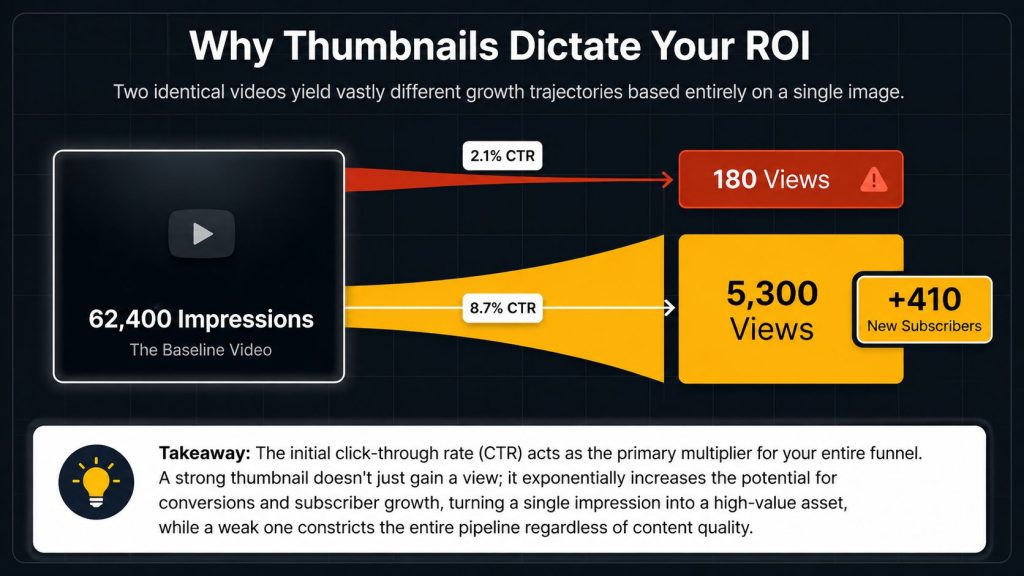
What Is Thumbium, Exactly?
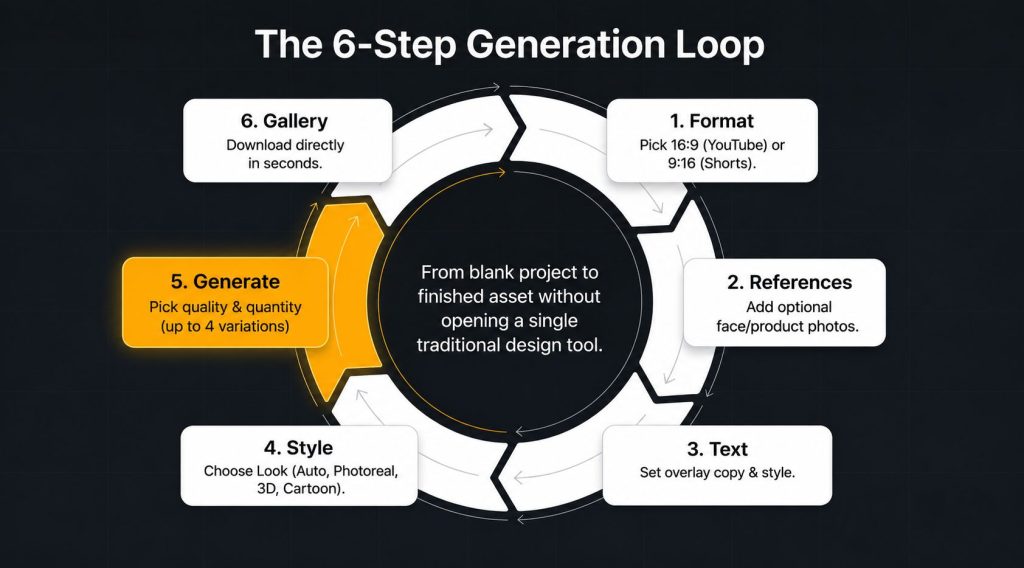
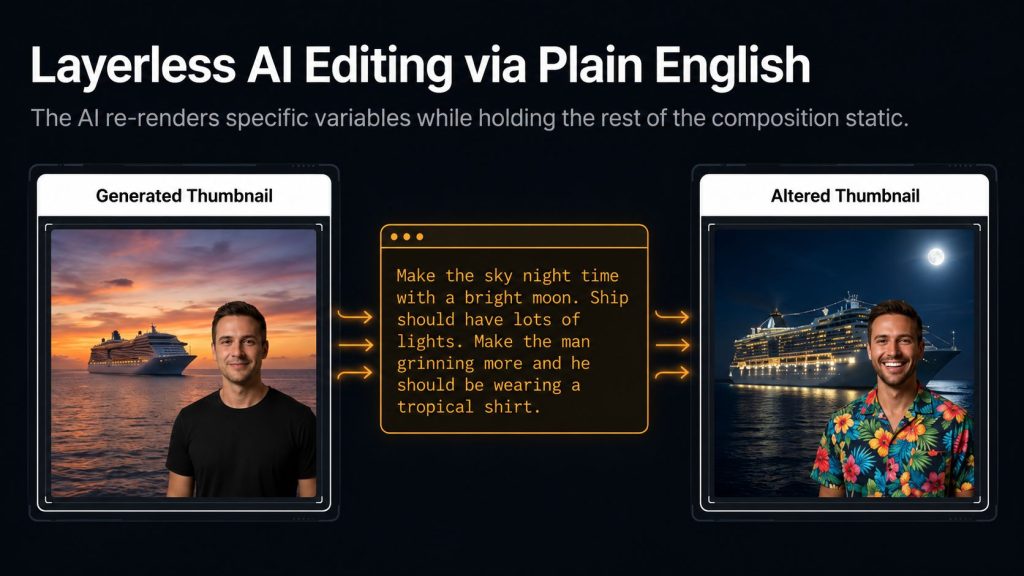
For newcomers to this Thumbium review series: Thumbium is a browser-based AI thumbnail generator designed with the YouTube publishing workflow in mind, not a general AI image tool adapted for thumbnails. You explain your desired outcome in clear, simple language and may optionally include a reference photo of yourself or a product, after which the system creates a finished thumbnail in the correct size for standard video ( 16:9) or Shorts (9:16).
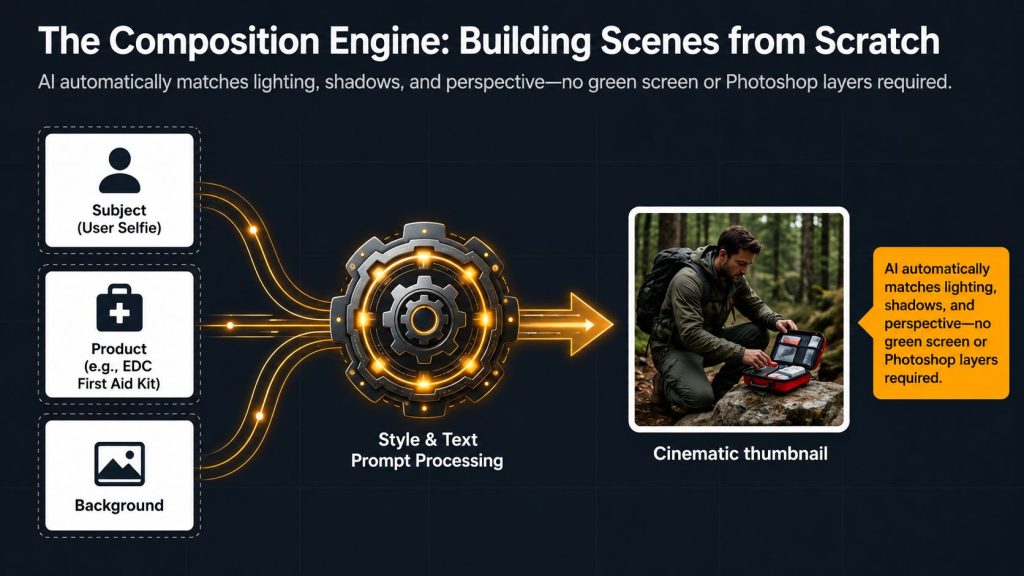
According to third-party reviews, reference-photo support stands out as one of the tool’s most distinctive features: upload a selfie, and it isolates you from the original image, inserting you into a newly generated scene while attempting to maintain lighting and perspective all to ensure a consistent, branded appearance across every thumbnail, without requiring a separate photoshoot for each video. It’s still unclear whether this now applies smoothly to Reels and TikTok’s varied aspect ratios and conventionsprecisely the open question this Thumbium review can’t yet confidently address.
Digging Into the Reels/TikTok Claim Specifically
Because this is the single biggest positioning change since our first Thumbium review, it deserves more scrutiny than a passing mention. Here’s exactly what we know and don’t know. What we know: the sales page’s title tag and meta description both changed between 18 Jul and 22 Jul, adding “Reels and TikTok” to language that previously only mentioned “YouTube.” That’s a real, dated, verifiable change — we captured both versions directly. What we don’t know: whether this reflects an actual new export format or aspect-ratio option added to the tool, a rebranding of existing capabilities that already technically covered vertical formats under the “Shorts” umbrella, or simply broader SEO-oriented language change with no functional difference at all.
The most likely explanation, based on what’s already confirmed about the tool, is the least dramatic one: Thumbium already generated 9:16 vertical output for Shorts at launch, and Reels (Instagram) and TikTok both use the identical 9:16 aspect ratio. It’s plausible the “Reels and TikTok” language is simply broadening the marketing description to reflect formats the tool already technically supported, rather than announcing new functionality. That’s a reasonable, low-confidence guess, not a confirmed explanation — and it’s exactly the kind of claim this Thumbium review flags rather than assumes, since presenting a marketing-copy change as a confirmed feature update would overstate what we actually know.
Who’s Behind Thumbium: Creator Track Record
Creator Track Record
Chris Derenberger is a long-running WarriorPlus vendor with a catalog that includes eBook Writer AI, PLR Wealth, and several other practical, single-purpose digital products, per MunchEye’s public launch history. That pattern — narrow, specific tools rather than broad “do everything” platforms — holds true with Thumbium as well, and it’s a reasonable positive signal for a brand-new product from a vendor who has shipped and (per public listings) supported prior launches in the same style.
Note: this is the first Derenberger launch we’ve tracked through a price-increase cycle. Whether the roughly 48% jump seen here a week after launch is typical for this vendor’s prior products, or unique to Thumbium, isn’t something we can confirm without reviewing pricing history on his earlier launches — flagged as an open item for future vendor-pattern tracking rather than a settled pattern.
For context on why that matters here: a brand-new AI tool with no buyer track record leans heavily on vendor history as a stand-in signal, and a serial vendor with a consistent product style is generally a more reassuring bet than a first-time launch account — though it’s worth being clear that vendor history says more about likely support and follow-through than it does about whether this specific tool’s output quality holds up at scale, which remains unverified a week into the launch.
Thumbium’s Core Features
- Prompt-to-thumbnail generationDescribe the scene in plain language, with no prompt-engineering skill required.
- Style, type, and layout presetsChoose a direction like high-energy clickbait, a cleaner professional look, or a reaction-face style.
- Dual and expanding format outputGenerate 16:9 thumbnails for YouTube and 9:16 for Shorts, with Reels and TikTok positioning mentioned on the sales page.
- Reference photo supportUpload a selfie or product image, and the AI extracts the subject into a brand-new generated scene.
- Up to four variations per generationCreate multiple thumbnail options at once so you can compare and choose the strongest design.
- Bring-your-own API key billingConnect your own OpenAI API key and pay only for your actual AI usage.
- Automatic background removal and scene compositionThe AI handles background removal and intelligently builds a complete thumbnail scene.
Full Funnel Breakdown: Current Pricing vs. Launch Week
This is the section that’s most different from our first Thumbium review, so it’s worth laying the two side by side rather than just reporting current numbers in isolation.
| Product | Launch Price (18 Jul) | Current Price (22 Jul) | Change |
|---|---|---|---|
| Thumbium Hobby (FE) | $17.00 | $25.00 | +47% |
| Thumbium Business (FE) | $29.00 | $43.00 | +48% |
| Thumbium Agency (FE) | $49.00 | $73.00 | +49% |
| Thumbium Remixer (OTO) | $27.00 | $27.00 | No change |
| Thumbium Copywriter (OTO) | $29.00 | $29.00 | No change |
| Thumbium Client Review (OTO) | $37.00 | $37.00 | No change |
Does the Math Still Work at the New Price?
Before diving into the specific numbers, it’s useful to consider this within the larger context of how WarriorPlus typically prices its launches, as that background helps determine whether this increase feels surprising or not. Most launches on the platform employ either time-limited or purchase- count-limited pricing, with the clear intention that prices will increase once the launch window ends or the purchase threshold is reached.
Regular followers of this space typically realize that the price shown during launch week may not reflect what they’ll pay a month later, and sellers often make this clear on the sales page using phrases like “ price increases soon” or a visible countdown timer. What makes this particular case deserving of a dedicated Thumbium review update instead of just a brief mention is the magnitude of the increase: around 48% is significant enough to influence a purchase decision, not just a minor, dollar-level rise.
Our initial Thumbium review positioned its core value as the time saved compared to the usual twenty-minute-to -an -hour manual thumbnail process, scaled across a creator’s weekly upload routine. That math doesn’t meaningfully differ between $25 and $17 the time-cost comparison wasn’t sensitive to a $8-$24 swing in the software price.
Since the bigger variable is always the creator’s own hourly value of time, not the tool’s sticker price. Where the new pricing does change the calculus is for more price-sensitive buyers who were specifically drawn in by a sub-$20 entry point; Hobby at $25 crosses a psychological threshold that $17 didn’t, even though the underlying value proposition is identical.
A Tier-by-Tier Look at the New Pricing
With the updated figures, it’s more useful to review each tier separately instead of viewing the price increase as one uniform change. At $25, the hobby plan still allows for 50 thumbnails per month, amounting to just under 50 cents per thumbnail when you use the full allowance each month not including the additional cost for OpenAI generation.
For a creator posting once or twice weekly, that allowance easily accommodates a few variations per upload without nearing the limit. At the old $17 price, the same calculation resulted in roughly 34 cents per thumbnail in software cost; the new price raises that figure, but the allowance remains the same, so the real usage experience how many thumbnails you can generate before hitting a limit is identical to what buyers received during launch week.
At $ 43 for 100 thumbnails per month, the pricing follows the same principle software cost per thumbnail rises to about 43 cents from 29 cents at launch, while the monthly allowance remains unchanged. This tier is ideal for creators who frequently test multiple video variations or manage two smaller channels from a single account.
Agency at $73 for 250 thumbnails a month is the tier most likely to interest agencies or multi-channel operators specifically — at this volume, the per-thumbnail software cost drops to roughly 29 cents even at the new price, which is actually cheaper per-unit than the Hobby tier despite the higher sticker price, simply because the fixed software cost is spread across more monthly output.
Pros and Cons (Updated)
✅ What’s Genuinely Good
- Core feature set and OTO structure unchanged and stable a week into launch.
- One-time purchase model still holds — no subscription introduced with this price update.
- Reference-photo and background-removal features remain a genuine time-saver over manual editing.
- Flat 50% commission unaffected by the price change, so affiliates earn proportionally more per sale.
- Vendor has a consistent, narrow-tool track record across multiple prior launches.
⚠️ Where To Be Careful
- Front-end price is up around 48% from launch week — Hobby now costs $25 instead of the original $17.
- Reels/TikTok support is mentioned on the sales page but hasn’t been independently verified.
- Sales and JV pages remain difficult to access directly, so some feature details rely on third-party coverage.
- Most feature information comes from affiliate bonus reviews rather than completely independent evaluations.
- There is still limited real-world, non-incentivized customer feedback available.
Buy It If / Skip It (Updated)
✅ Buy It If:
- You publish consistently and manual thumbnail creation is slowing your workflow.
- You’re comfortable with the current $25–$73 pricing and it still offers better value than hiring a designer or paying for a subscription tool.
- You already have, or don’t mind setting up, an OpenAI API key.
- You’d rather lock in today’s price instead of risking another increase later.
❌ Skip It If:
- You only wanted it because of the original sub-$20 launch price.
- You’re buying mainly for the promised Reels/TikTok support, which hasn’t been independently confirmed.
- You prefer waiting for more unbiased customer reviews before purchasing.
- You publish infrequently, so the time savings won’t justify the current entry price.
Frequently Asked Questions
Get These 6 Bonuses When You Buy Through My Link
I’ve added these extra bonuses to help you get more value from your purchase and move faster with promotion, automation, traffic, and sales.

DFY Social
A done-for-you social media bonus created to help you promote offers faster without starting from a blank page.

Quantum AI
A powerful AI-focused bonus designed to help you improve productivity, create faster, and simplify your online workflow.

Anonymous AI
Learn how to build and promote online using AI without needing to show your face or become a personal brand.

Video Marketing Profits
A practical bonus focused on using simple videos to attract attention, build trust, and drive more clicks to your offers.

High Ticket AI
This bonus helps you understand how AI can be used around premium offers, positioning, and higher commission opportunities.

Traffic Funnel Blueprint
A simple funnel blueprint to help you understand how to move visitors from traffic sources toward your affiliate offer.