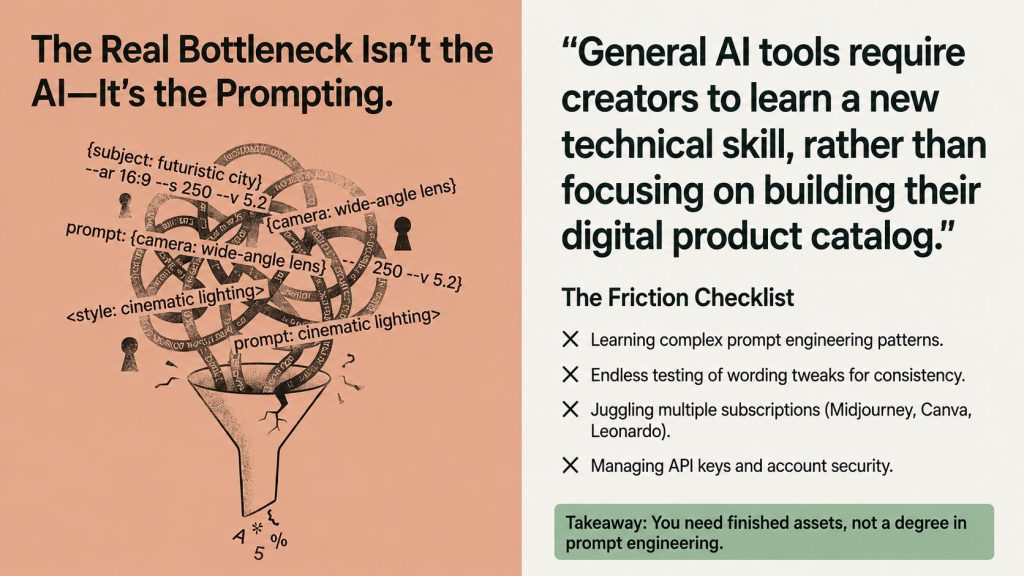
If you’ve ever used ChatGPT, Midjourney, or Leonardo to make printables or KDP assets, you likely already recognize that the real limitation isn’t the AI it’s all the tools and processes surrounding it. Studying prompt patterns. Testing minor wording adjustments that somehow alter everything. Managing two or three different subscriptions since no one tool covers everything. And, for some tools, you’re required to connect and manage an API key before creating your first sellable file. That’s precisely the issue I’m addressing in this Imagine AI Review.
Imagine AI, developed by The Bros Studio, is designed to remove that entire layer. Rather than being prompted, you select a creation mode, pick from a brief list of preset options, and receive a ready-to-use, commercial asset no text to worry about, no account to link, no additional tool to launch. In this Imagine AI Review, I’ll analyze whether that streamlined workflow truly lives up to its claims.
I reviewed the entire sales page in depth including all 15 creation modes, the credit and subscription model, bundled bonuses, pricing tiers, and every detail in the FAQ to clearly explain what it offers, how much it costs over time, and for whom it’s truly worth purchasing. This isn’t a reworded sales pitch; where the sales page left things unclearsuch as the refund policy or the OTO contentsI’ve stated those gaps directly instead of guessing to fill them in. If you’re thinking about Imagine AI, this Imagine AI Review should help you see things more clearly before making a purchase.
Quick Summary Table
| Category | Details |
|---|---|
| Product Name | Imagine AI |
| Creator | The Bros Studio |
| Core Function | 15 no-prompt creation modes for digital products |
| Target Platforms | Amazon KDP, Etsy, Teachers Pay Teachers, Gumroad, Shopify |
| API Key Required | No |
| Price | $27 (marked down from $499) |
| Free Credits | 3,000 credits for the first 30 days |
| Ongoing Cost | Optional $15/month for 7,000 credits/30 days after the free period |
| Guarantee | Referenced in FAQ; confirm exact terms before purchase |
| Commercial Rights | Included |
| Skill Level | Beginner-friendly, no prompt-writing or design background needed |
Imagine AI — Create Digital Products Faster
Skip complicated prompting and create ready-to-use digital product assets with a simple, guided AI workflow. Choose your creation mode, select your preferences, and let Imagine AI handle the prompt generation.
If you’re looking for a simpler way to produce KDP books, Etsy printables, worksheets, coloring pages, stickers and other digital products without becoming an expert prompt engineer, Imagine AI is worth checking out.
🚀 Get Imagine AI + $1,000+ BonusesOne-time access • Bonus availability may be limited
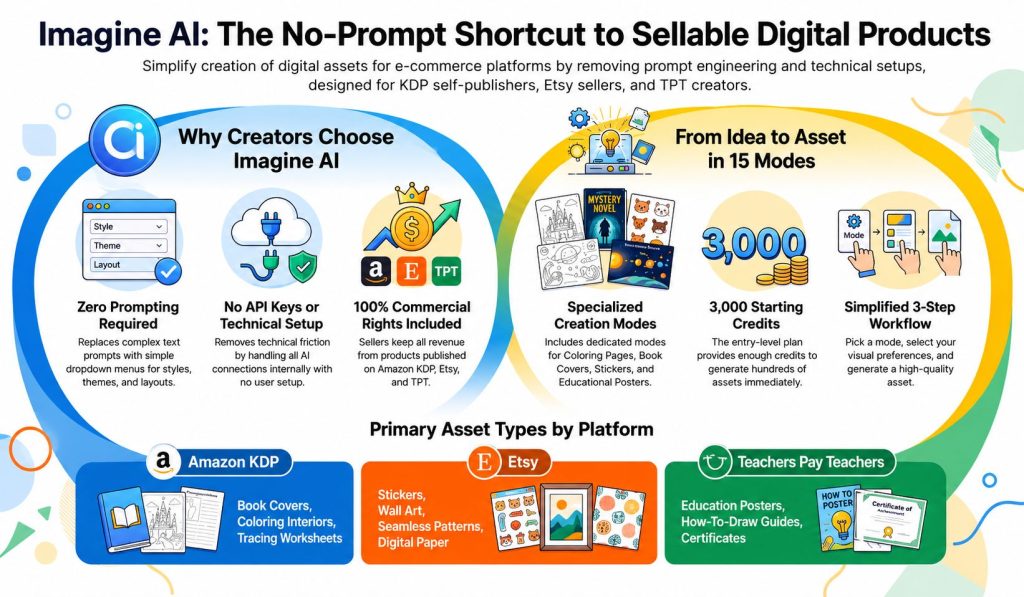
Table of Contents
What Is Imagine AI?
Imagine AI is a browser-based AI creation tool designed for creators building digital products to sell not a generic image generator that requires you to adapt it to fit specific publishing needs. Instead of typing prompts and hoping for a usable result, users pick one of 15 specialized creation modes such as Coloring Page, Cover Book, or Seamless Pattern and then select from a brief set of preset style, theme, and layout choices. The tool automatically constructs the base prompt and creates the asset behind the scenes. That focused approach is among the first things that catch attention in this Imagine AI Review.
The difference is more significant than it may initially seem. To get a general AI image generator to produce something resembling a KDP coloring page or an Etsy sticker sheet, you need to carefully craft prompts that convey your vision, then refine them repeatedly until the output matches what a customer would realistically buy. Imagine AI reverses that dynamic: the model already understands what a coloring page or sticker sheet should look like, so your role is simply selecting the directionnot detailing the end goal. When comparing AI creation tools, this workflow is an important factor to keep in mind during an Imagine AI Review.
It is also clearly focused on real marketplaces rather than generic ” AI art.” Amazon KDP, Etsy, Teachers Pay Teachers, Gumroad, and Shopify are explicitly listed on the sales page, and a bundled training course guides users through the actual steps of publishing and listing including title and keyword strategies, product packaging, and presentation rather than simply delivering files without instructions for getting them live. That focus on the marketplace makes Imagine AI especially compelling for this Imagine AI Review.
Who Created It?
Imagine AI is developed by The Bros Studio, a trio of co-founders Radahn Ha, Ryan Keikichi, and Anton Fui whose goal is to make self-publishing easier to access, more profitable, and user-friendly for creators lacking design or technical skills. The sales page claims the team has launched over 20 software tools, serves more than 4,999 global users, boasts a 4.7 out of 5 average rating, and reports a claimed 78% increase in productivity. These background details are essential context to include in any balanced Imagine AI Review.
It’s important to be clear about what those figures represent: the sales page explicitly calls this “data pulled from our internal creator dashboard,” indicating that it’s self-reported by the vendor and not independently verified or audited by a third party. That does n’t automatically mean the numbers are incorrect, but it does mean they should n’t be presented in marketing materials as independently verified statisticsthey’re the creator’s own assertion about their performance, and readers should be aware of that distinction. That distinction matters when assessing the credibility of the claims covered in this Imagine AI Review.
How Does It Work?
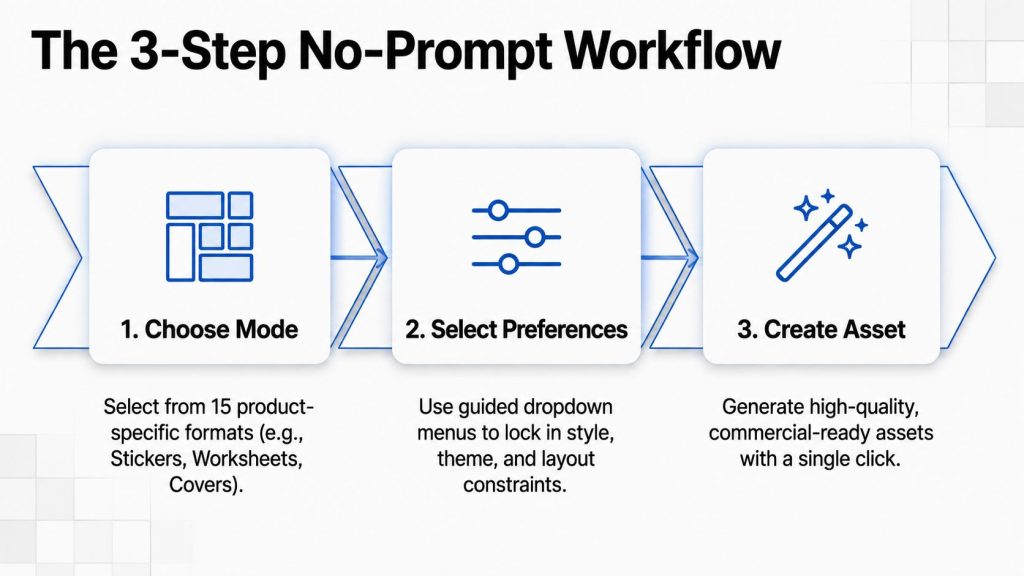
The workflow is deliberately reduced to three steps, and the sales page is emphatic that none of them involve prompt writing or technical setup.
Step 1 — Choose Your Creation Mode
After selecting a mode, you’ll see a collection of preset options tailored to that product type including styles, themes, layouts, and other pertinent attributes. This is the most similar to ” prompting” in the entire process, and even this step uses dropdown options instead of free text input. The sales page presents this as the main distinction from typical AI tools: rather than having to figure out which words yield specific outcomes, you select from pre-tested options that are proven to work for that mode. That guided approach forms a key component of the workflow covered in this Imagine AI Review.
Step 2 — Select Your Preferences
After selecting a mode, you’ll see a collection of preset options tailored to that product type including styles, themes, layouts, and other pertinent attributes. This is the most similar to ” prompting” in the entire process, and even this step uses dropdown options instead of free text input. The sales page presents this as the main distinction from typical AI tools: rather than having to figure out which words yield specific outcomes, you select from pre-tested options that are proven to work for that mode. That guided approach forms a key component of the workflow covered in this Imagine AI Review.
Step 3 — Create Your Asset
Once your mode and preferences are chosen, Imagine AI automatically crafts the base prompt and produces a high-quality asset with just one click. The final output is said to be ready for its intended platform no extra reformatting step is mentioned on the sales page. That streamlined generation process is one of the key workflow advantages explored in this Imagine AI Review.
What makes this structure appealing is its consistency rather than its novelty. Even minor wording adjustments can lead to drastically different outcomes from prompt-based tools, which is one reason the sales page emphasizes “ one tiny change can break the entire result” as a major pain point in the current workflow. A guided, mode-based system sacrifices some of that open-ended flexibility in exchange for more predictable, on-point output a sensible compromise for someone aiming to produce a consistent product line rather than explore abstract AI art. For sellers prioritizing consistent production over constant experimentation, this trade-off holds significant weight in the Imagine AI Review.
The 15 Creation Modes
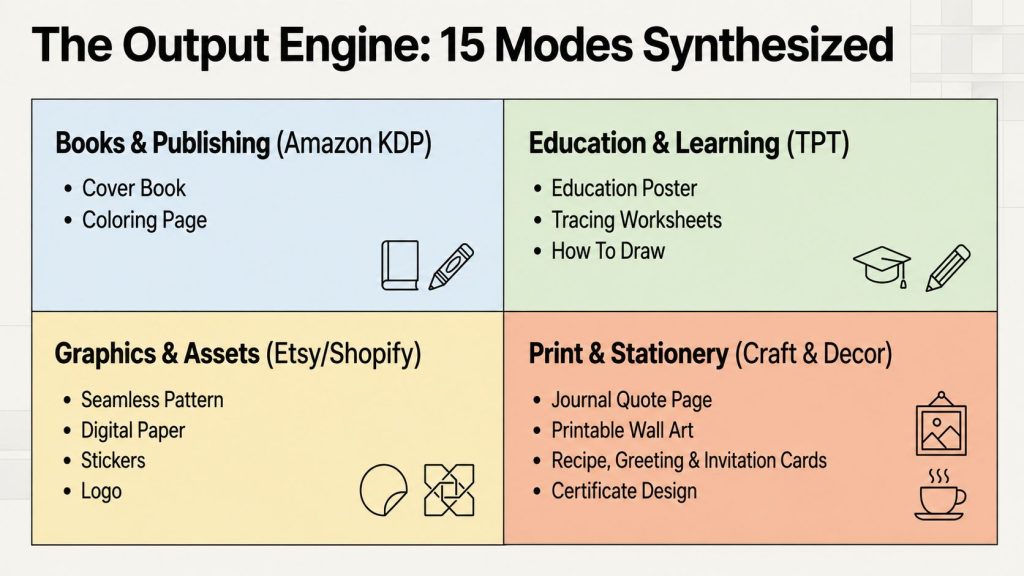
Imagine AI’s 15 modes span several practical product categories rather than clustering around one type of asset. Here’s the full breakdown:
| # | Mode | Category | Best For |
|---|---|---|---|
| 1 | Cover Book | Books & Printables | KDP covers, workbook covers, children’s book covers |
| 2 | Coloring Page | Books & Printables | Coloring books, activity books |
| 3 | Education Poster | Educational | Classroom and homeschool resources |
| 4 | Journal Quote Page | Journaling | Journals, planners |
| 5 | Seamless Pattern | Textures | Digital paper, background designs |
| 6 | Tracing | Education | Tracing worksheets |
| 7 | Sticker | Graphics | Sticker sheets for Etsy/print |
| 8 | Digital Paper | Textures | Scrapbooking, digital design assets |
| 9 | How To Draw | Education | Step-by-step drawing guides |
| 10 | Recipe Card | Cards & Stationery | Recipe cards, cookbook inserts |
| 11 | Printable Wall Art | Decor | Etsy wall art listings |
| 12 | Logo | Branding | Logo concepts |
| 13 | Greeting Card | Cards & Stationery | Greeting card products |
| 14 | Invitation Card | Cards & Stationery | Invitation templates |
| 15 | Certificate Design | Business Documents | Certificates, awards |
Several items on this list are particularly noteworthy. First, it strongly favors the overlap between KDP and Etsy formats like Cover Book, Coloring Page, Journal Quote Page, and Printable Wall Art are all well-suited for both platforms at once, meaning a single asset created in one format could reasonably be adapted for two different marketplaces.
Second, the addition of Education Poster, Tracing, and How To Draw modes indicates a targeted effort to appeal to the Teachers Pay Teachers audience, rather than viewing it as an incidental feature. Third, features such as Logo and Certificate Design broaden the tool’s utility beyond just selling printables, reaching into small business and client project scenarioscovering a broader range than most single-function PLR or AI art tools. That wider scope is one of the more intriguing elements to assess in this Imagine AI Review.
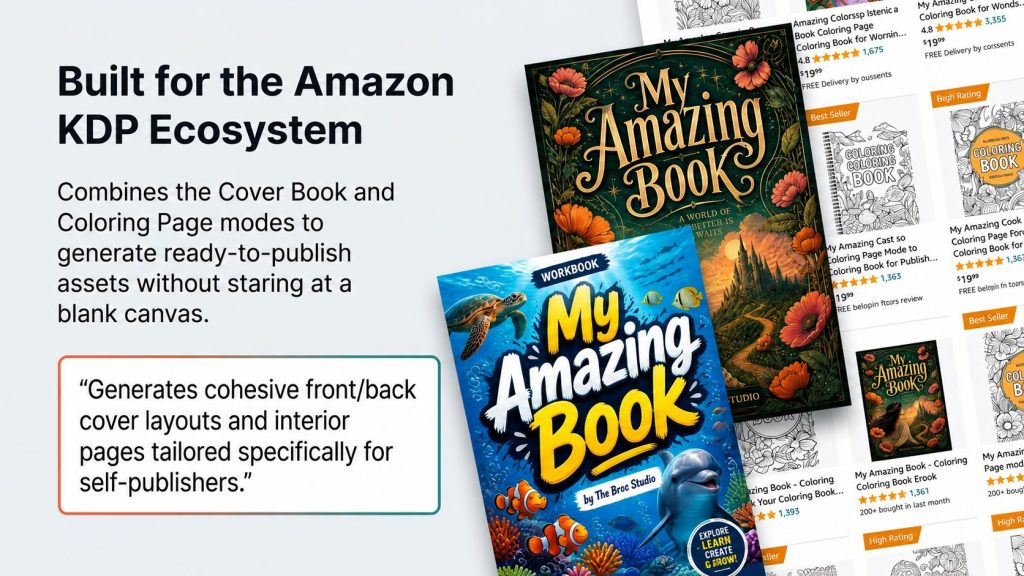
The sales page’s case studies demonstrate two of these features combined: a complete coloring book created using both the Cover Book and Coloring Page modes ( including interior pages, front and back covers, and title/ keyword guidance), and an Etsy sticker pack assembled via the Sticker mode, complete with packaging and preview-image instructions. Both examples highlight that the modes are designed to function together to produce a complete, list-ready product, not as isolated curiosities. This product-centered workflow is another key aspect deserving closer examination in this Imagine AI Review.
Benefits
Stepping back from the individual modes, the practical benefits Imagine AI is built around come down to a handful of genuine time-and-friction savings:
Removes the prompt-engineering learning curve entirely. Every mode uses guided preset choices instead of open text prompts, which matters most for beginners who don’t yet know what “good” prompt language even looks like for a given product type.
No API key setup or management required. This sounds like a small detail, but for non-technical users, connecting and securing an API key is a genuine barrier — and a genuine risk, since a misconfigured key can lead to unexpected charges. Removing that step removes both the friction and the risk.
Covers a wide range of product types relevant to multiple real marketplaces from one workflow, rather than requiring separate tools or subscriptions for each product category.
Bundled training connects asset creation to actual KDP and Etsy publishing steps, not just file generation — which addresses a common failure point where creators end up with good assets but no clear next step toward an actual listing.
Commercial rights included with no stated royalties or ongoing revenue share on what you create, which simplifies the licensing question that trips up buyers of many AI and PLR tools.
Pros and Cons
| Pros | Cons |
|---|---|
| No prompt writing or API key required | $15/month subscription needed for continued high-volume use after 30 days |
| 15 modes covering multiple product categories | Refund policy terms not fully visible pre-purchase |
| Bundled training ties output to real publishing steps | OTO contents (Control Suite, Grown Suite) unconfirmed |
| Commercial rights included | Stated user/rating stats are self-reported, not independently verified |
| Large discount off stated $499 regular price | Guided modes offer less open-ended creative control than full prompting |
Imagine AI — Create Digital Products Faster
Skip complicated prompting and create ready-to-use digital product assets with a simple, guided AI workflow. Choose your creation mode, select your preferences, and let Imagine AI handle the prompt generation.
If you’re looking for a simpler way to produce KDP books, Etsy printables, worksheets, coloring pages, stickers and other digital products without becoming an expert prompt engineer, Imagine AI is worth checking out.
🚀 Get Imagine AI + $1,000+ BonusesOne-time access • Bonus availability may be limited
Who Should Buy It?
KDP sellers who want book covers, coloring book interiors, and printables without starting from a blank page or hiring a designer for every new title
Etsy, Gumroad, or Shopify digital product sellers wanting to expand their catalog faster without adding another monthly tool subscription to their stack
Teachers Pay Teachers creators who need a steady supply of worksheets, posters, and classroom printables and want a workflow purpose-built for educational content
Busy creators who want an idea turned into a finished, sellable asset in minutes rather than an evening of trial and error
Complete beginners with no design background, no prompting experience, and no interest in learning how to manage an AI API account just to make a printable
Who Should Avoid It?
Anyone expecting the tool alone to generate income. The sales page is direct about this: Imagine AI helps you create faster, but you still have to test, publish, and sell — it’s explicitly not pitched as a passive-income button.
Casual users who only need an occasional graphic. Both the pricing (built around volume, with a credit system) and the positioning (aimed at “creators who move fast”) assume regular, ongoing digital product creation rather than a one-off need.
Anyone unwilling to eventually pay $15/month for continued higher-volume credit access once the initial 30-day free allotment runs out. It’s optional and cancellable, but it’s a real cost that a buyer focused only on the $27 headline price could easily overlook.
Creators who need full, open-ended prompt control. The guided-mode approach trades flexibility for consistency and ease of use — a fair trade for many buyers, but not for someone who wants granular creative control over every detail of an image.
Pricing Breakdown — Credits & Subscription Explained
The front end is priced at $27, down from its regular price of $499 (” Save 95%”), as a one-time fee that includes the core software, all 15 creation modes, and the bonus resources detailed below. The gap between the one-time entry price and the advertised regular price is a key point to consider in this Imagine AI Review.
Included with purchase: 3,000 free AI credits for the first 30 days described on the sales page as sufficient to generate hundreds of digital assets across multiple categories. This is a genuinely generous trial periodnot just a few free generationsand it gives new buyers real flexibility to explore different modes and product concepts before deciding whether continued access is worth the cost. For new users, that first credit allowance stands out as one of the more attractive features covered in this Imagine AI Review.
Following the first 30 days, if you require ongoing higher-volume access, an optional $ 15 monthly subscription offers 7,000 new credits every 30 days and can be canceled anytime. This detail is often overlooked when quickly scanning the sales page, as the headline price and countdown timer focus on the $27 figure yet it represents a real, recurring expense for anyone who continues using the service past the first month, and it should be considered in any evaluation of whether this is worth it. Grasping this recurring-cost model is crucial for evaluating the long-term value of Imagine AI, which is why it merits focus in this Imagine AI Review.
| Item | Cost |
|---|---|
| Front End (core software + 15 modes + bonuses) | $27 one-time |
| First 30 days of credits | 3,000 credits, included free |
| Continued credits after 30 days (optional) | $15/month for 7,000 credits/30 days |
Put another way: if you only need a burst of assets for a single product launch, the $27 one-time price plus the free 3,000 credits may be all you ever pay. If you plan to use Imagine AI as an ongoing part of a ratio publishing or Etsy shop workflow, budget for the $15/month on top of the front-end cost.
OTO Breakdown
Per the WarriorPlus affiliate offer, two upsells follow the front end:
Imagine Control Suite ($47): Contents were not detailed on the front-end sales page provided for this review. Based on the naming convention, this likely offers additional creative controls, modes, or credit allowances beyond the core 15 — but this is an inference, not a confirmed fact, and dedicated sales copy for this upsell shouldn’t be written until its actual contents are verified.
Imagine Grown Suite ($97): Similarly undetailed on the front-end page. The name suggests a tier aimed at scaling usage further — more credits, more modes, or multi-seat/agency-style access — but again, this should be confirmed against the actual OTO sales page before being described definitively to readers.
Neither upsell is required to use the front-end Imagine AI software or its 15 creation modes; both should be treated as optional add-ons rather than prerequisites when writing conversion copy.
Bonuses Included
Commercial Rights — What You Can Do With Your Creations
Licensing confusion is a common friction point with AI-generated and PLR-adjacent content, so it’s worth spelling out clearly. Per the sales page, assets created with Imagine AI come with 100% commercial rights, meaning you can:
Publish books on Amazon KDP
Sell printables on Etsy
Create digital downloads
Build educational resources
Sell asset packs and design resources
Use creations in client projects
Use creations in commercial products generally
Keep 100% of the revenue earned
No royalties, attribution requirements, or ongoing revenue share back to The Bros Studio are mentioned anywhere on the sales page. This is simpler licensing than many PLR products, which often carry restrictions like “cannot resell rights” or “cannot use in advertising” — Imagine AI’s stated terms are comparatively unrestricted, positioning the generated assets as fully the creator’s own the moment they’re produced.
Real Use Case Examples
Based on the case studies and audience segments described directly on the sales page:
A KDP seller uses the Cover Book and Coloring Page modes together to assemble a complete coloring book — interior pages, a front/back cover concept, and title/keyword direction — moving from concept to a KDP-ready product presentation in one session.
An Etsy seller uses the Sticker mode to build a cohesive sticker bundle, then follows the bundled Etsy Digital Product Launch Kit to handle packaging, hero/preview images, and listing title and keyword direction.
A Teachers Pay Teachers creator uses the Education Poster and Tracing modes to build a set of classroom-ready worksheets and posters, using the TPT Resource Creator System bonus to guide the listing and packaging process.
A digital product seller uses the Digital Paper and Seamless Pattern modes to build a scrapbooking or texture-focused asset pack, then lists the same pack across multiple marketplaces (Etsy, Gumroad) using the broader Digital Product Launch & Sales Operating System bonus.
Imagine AI vs. Alternatives
| Factor | Imagine AI | Midjourney / Leonardo | Canva |
|---|---|---|---|
| Prompt Writing Required | No | Yes | Partial (templates + some prompting) |
| API Key Required | No | Sometimes (for API access) | No |
| Publishing-Specific Modes | Yes, 15 modes built for KDP/Etsy/TPT | No, general image generation | Partial (templates, not AI-native) |
| Commercial Rights | Included | Varies by plan | Varies by plan |
| Pricing Model | $27 one-time + optional $15/month | Monthly subscription | Free/monthly subscription |
The honest way to put it: Midjourney and Leonardo offer greater power and flexibility for those who truly aim to master prompting and achieve highly specific, custom visual styles. Canva excels in manual, template-driven design tasks where you need full, hands-on control over each element. Imagine AI operates in a completely separate space it sacrifices some flexibility for faster, more predictable performance, tailored specifically for users who want to consistently publish products on KDP, Etsy, or TPT without needing to master prompt engineering or manual design. That positioning makes the comparison particularly crucial when assessing the practical strengths and limitations discussed in this Imagine AI Review.
Imagine AI — Create Digital Products Faster
Skip complicated prompting and create ready-to-use digital product assets with a simple, guided AI workflow. Choose your creation mode, select your preferences, and let Imagine AI handle the prompt generation.
If you’re looking for a simpler way to produce KDP books, Etsy printables, worksheets, coloring pages, stickers and other digital products without becoming an expert prompt engineer, Imagine AI is worth checking out.
🚀 Get Imagine AI + $1,000+ BonusesOne-time access • Bonus availability may be limited
Frequently Asked Questions – Imagine AI Review
1. What exactly is Imagine AI?
It’s a browser-based AI tool with 15 purpose-built creation modes for making sellable digital products — coloring pages, book covers, stickers, printables, and more — without writing prompts.
2. Do I need an API key or technical setup?
No. The sales page states no API key is required and no technical setup is needed beyond using the tool directly.
3. How do the credits and subscription work?
New users get 3,000 free credits for the first 30 days. After that, an optional $15/month subscription provides 7,000 fresh credits every 30 days, cancellable anytime.
4. Which platforms is this compatible with?
The sales page names Amazon KDP, Etsy, Teachers Pay Teachers, Gumroad, Shopify, and Pinterest as relevant target platforms for the generated assets.
5. Can I sell what I create?
Yes. The sales page states 100% commercial rights are included, allowing use in books, printables, digital products, educational resources, and client work, with no revenue share required.
6. Do I need design or prompting experience?
No. The tool is positioned as beginner-friendly, using preset dropdown options instead of prompt writing, with a bundled training course walking through the full workflow.
7. Will future updates be included?
This was listed as an FAQ heading on the sales page, but the specific answer wasn’t visible in the content provided — confirm this detail before publishing.
8. Are there other feature upgrades besides the core software?
Yes — the WarriorPlus funnel includes two upsells, Imagine Control Suite ($47) and Imagine Grown Suite ($97), though their exact contents weren’t detailed on the front-end sales page.
9. What is the refund policy?
This is listed as an FAQ heading on the sales page, but the specific answer text wasn’t visible in the content provided — confirm the exact refund terms on the order page or with the vendor before publishing a guarantee claim.
10. Is this worth it if I only need the occasional graphic?
Probably not — the sales page itself frames the tool as built for regular digital product creators and publishers rather than one-off, casual graphic needs.
Get These 6 Bonuses When You Buy Through My Link
I’ve added these extra bonuses to help you get more value from your purchase and move faster with promotion, automation, traffic, and sales.
DFY Social
A done-for-you social media bonus created to help you promote offers faster without starting from a blank page.

Quantum AI
A powerful AI-focused bonus designed to help you improve productivity, create faster, and simplify your online workflow.

Anonymous AI
Learn how to build and promote online using AI without needing to show your face or become a personal brand.
Video Marketing Profits
A practical bonus focused on using simple videos to attract attention, build trust, and drive more clicks to your offers.

High Ticket AI
This bonus helps you understand how AI can be used around premium offers, positioning, and higher commission opportunities.
Traffic Funnel Blueprint
A simple funnel blueprint to help you understand how to move visitors from traffic sources toward your affiliate offer.