If you’re exploring new ways to create low-content or activity-style books for Amazon KDP, the KDP Monocrafter Review is worth your attention. The idea behind this tool is fairly simple: upload an ordinary JPG or PNG image, choose a visual conversion style, adjust a few settings, and turn the result into artwork that can potentially be used inside a KDP book. Instead of spending hours manually creating patterns, pixel artwork, or monochrome designs in complicated graphics software, the platform aims to handle much of that process directly from your browser.
At first glance, the $17 front-end price makes KDP Monocrafter look like an inexpensive tool to experiment with, especially for beginners who don’t want another monthly software subscription. It includes multiple rendering options, image adjustments, project storage, PDF export, and several bonuses focused on book ideas and niche research. However, the KDP Monocrafter Review also uncovered an important point that shouldn’t be overlooked: the sales page and JV page appear to give different descriptions of the front-end’s multi-page book capabilities.
That discrepancy matters if your main goal is to create complete books rather than individual interior pages. The sales page suggests that the front-end is primarily designed for single-page artwork, while the JV material says the $17 version can create up to 20 pages per book project. Because those claims directly affect what you’re actually getting for the entry price, I wouldn’t recommend assuming either version is correct without confirmation from the vendor.
In this KDP Monocrafter Review, I’ll break down what the tool actually offers, how the workflow works, what’s included in the $17 front-end, the available upgrades, the strengths and weaknesses, and who I think should consider it. I’ll also separate the clearly documented features from claims that couldn’t be independently verified, so you can make a more informed decision before spending your money.
The core concept is specific and genuinely well-explained: upload an image, turn it into monogram, ASCII, pixel, or pattern artwork, and export a KDP-ready PDF, no design software required. The niche angle (monochrome pixel-reveal books) is backed by specific, checkable-sounding data rather than vague hype. Where this review has to stop and flag something important: the sales page and JV page directly disagree about whether the $17 front end can build a full multi-page book or only a single page. That’s not a minor detail — it’s close to the core of what you’re paying for — so confirm it directly with the vendor before assuming either version is true.
See The Live Price →Table of Contents
Quick Summary
- Product: KDP Monocrafter
- Creator: Owen Bennet, KoJi Academy — individually named, but no independent public track record could be confirmed
- Format: Cloud-based web app, no installs, works in any browser
- Listed Price: $17.00, matches the sales page, JV page, and live dashboard exactly
- Refund Policy: 30 days, clearly stated, subject to a separately linked standard refund policy
- Rights: Full commercial license included — sell generated art books on KDP or Etsy, keep 100% of profits
- Funnel Size: 11 listings, approximately $537 if every item is purchased
- Get It Here: KDP Monocrafter
What Is KDP Monocrafter, Exactly?
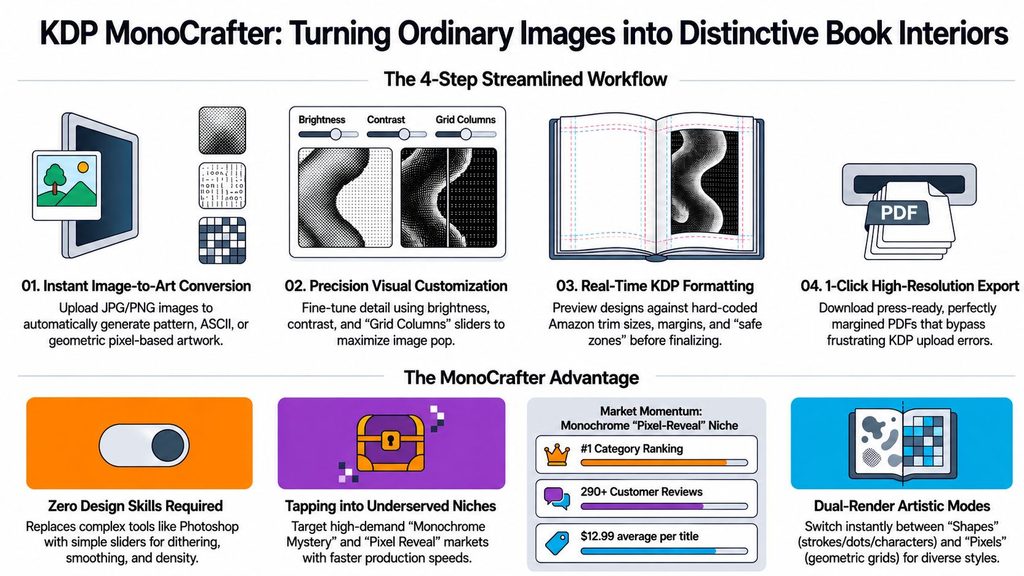
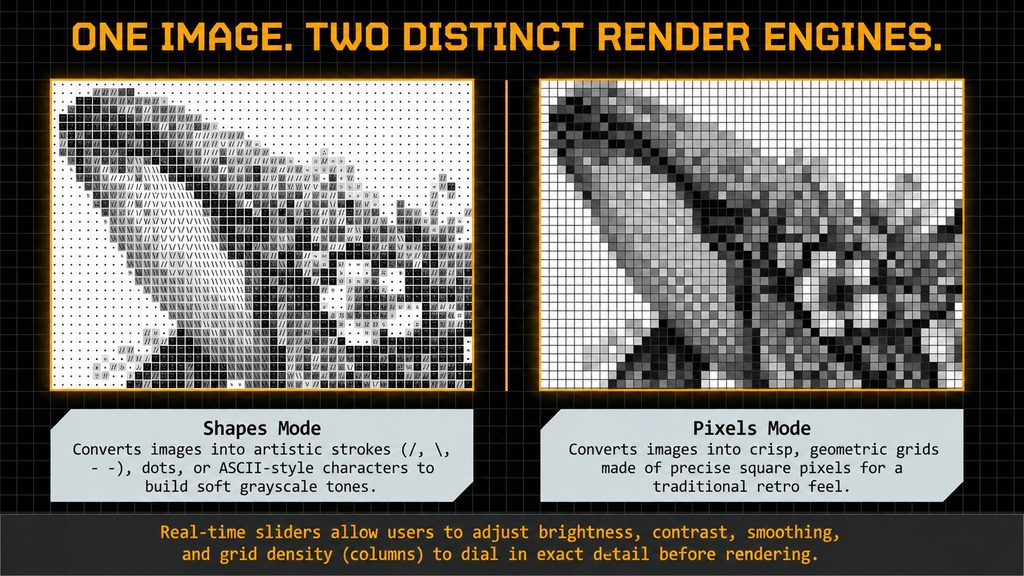
Behind the KDP Monocrafter Review, the product presents a browser-based workspace that accepts an uploaded image ( in JPG or PNG format) and transforms it into structured visual art through two primary modes: “ Shapes,” which turns the image into artistic strokes, dots, or ASCII characters, or “ Pixels,” which renders it as a grid of square pixels. Users can adjust the output with sliders for brightness, contrast, smoothing, dithering, and grid density to refine the final result. Once you ’re satisfied with the preview, the tool generates a high-resolution, KDP-formatted PDF that includes Amazon’s trim sizes, margins, and gutter settingspre-set into the file so the “ safe zones” remain visible on your canvas as you design.
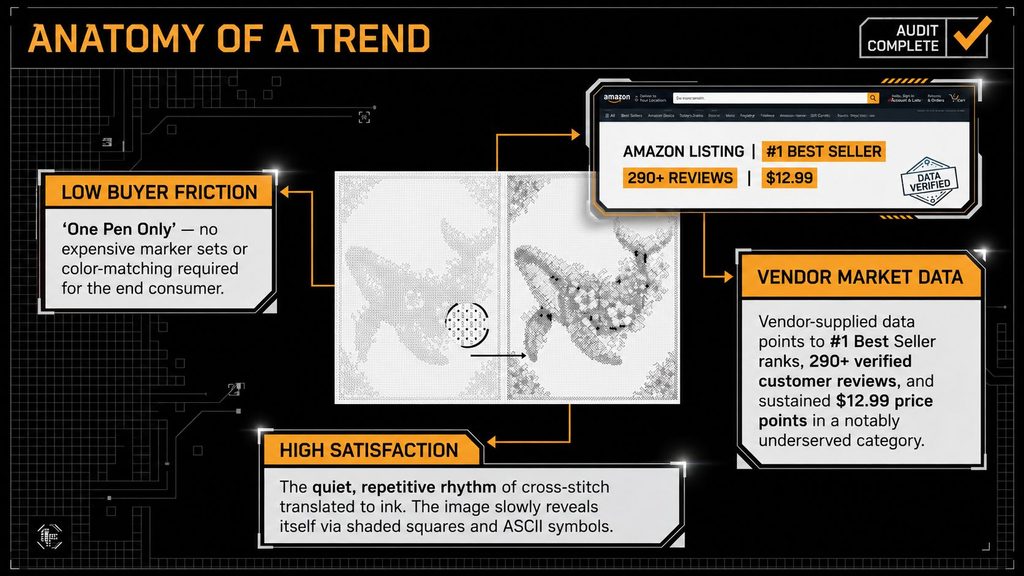
In this KDP Monocrafter Review, it’s worth highlighting the specific niche focus: the sales page contends that monochrome color-by-number and pixel-reveal books are experiencing genuine buyer demand on Amazon, yet remain relatively underserved compared to mainstream coloring books, journals, and planners a claim supported by concrete data ( including a 1 category best-seller rank, over 290 reviews, and a consistent $12.99 price point), all drawn from screenshots of public Amazon listings. That’s a more specific and verifiable assertion than most “hot niche” pitches typically offer, though this review did not independently confirm the listings referenced.
One important point to highlight in this KDP Monocrafter Reviewsince it directly impacts what you can createis that the sales page’s FAQ explicitly says the front-end tier is “ optimized for generating ultra-high -quality, single-page interior artwork,” with bulk multi-page book generation offered as an add-on. That detail is critically important for anyone planning to create a full book interior at the $ 17 price point see the discrepancy section below for why this issue remains unresolved.
Creator Trust Assessment — Who’s Behind This?
Owen Bennet is explicitly listed on the sales page, complete with a photo and a personal email address making him more individually identifiable than many other vendors featured on this site, who only operate under their brand names. That said, the KDP Monocrafter Review research found no verifiable prior launch history or public record for WarriorPlus under this name, suggesting it may either be a first-time launch or from a vendor with extremely limited public exposure so far. This is presented straightforwardly, without framing it as either a warning sign or an advantage for the creatorit’s simply what the evidence indicates, much like the trust profile seen on AI App Alchemy earlier in this series.
Additionally, a fake third-party “review” of this exact product was discovered and removed during the KDP Monocrafter Review research see the notice at the top of this article. That does n’t reflect poorly on the creator alone ( review-mill sites routinely publish this kind of content about products, no matter how the actual vendor behaves), but it’s useful context for anyone seeking outside opinions on this product and stumbling upon that specific result.
Funnel Verification — Sales Page, JV Page, and Live Dashboard
| Listing | Price | Cross-Check Result |
|---|---|---|
| Core Engine (FE) | $17.00 | Matches all 3 sources |
| AI Portfolio Profit Coach (bump) | $19.00 | Matches JV page |
| Pro Monocrafter / “MonoCrafter PRO” (OTO 1, lower) | $37.00 | Matches JV page’s dual pricing |
| Premium Monocrafter / “MonoCrafter PRO” (OTO 1, upper) | $67.00 | Matches JV page’s dual pricing |
| AI Book Concept Validator (OTO1 bump, x2 listings) | $19.00 each | Matches JV page (attached to both price tiers) |
| AI Image Arsenal (OTO 2) | $37.00 | Matches JV page exactly |
| Bot for KDP keyword miner (OTO2 bump) | $19.00 | Matches JV page exactly |
| KDP AI Agency In-a-Box (OTO 3) | $87.00 | Matches JV page exactly |
| Book Description & Sales Copy Swipe (OTO3 bump) | $19.00 | Matches JV page exactly |
| Monocrafter White label / “Source Code License” (OTO 4) | $197.00 | Price matches; display name differs |
| Total, one full pass | ~$537.00 |
HIGH SEVERITY — Does The $17 Tier Build Multi-Page Books, Or Not?
The sales page’s FAQ says the front-end version is “ optimized for generating ultra-high -quality, single-page interior artwork,” and multi-page book creation is available as an upgrade. The JV page, which describes the identical $17 front-end offer to affiliates, states that it includes the ability to ” Create up to 20 Pages per book project.” Full Book PDF Export included. These two statements cannot both be true as they are written.
This KDP Monocrafter Review cannot determine which version is accurate among the available pagesit presents the information exactly as it was found. If your reason for considering this purchase is to build a complete, multi-page book interior directly from the $17 tier, verify that capability directly with the vendor before buyingdon’t assume either page accurately reflects it. This difference could significantly alter the value of the front-end offer, particularly for users intending to publish full KDP books instead of individual interior pages. Obtaining written confirmation prior to purchasing is the safest course of action.
What’s Actually Included, According To The Sales Page
Setting aside the multi-page question, the remaining front-end features are clearly defined and uniform across both pages: unlimited image conversions from day one, support for both Pattern/ Shape and Pixel rendering modes, customizable brightness, contrast, smoothing, and dithering controls, a grid density slider, a cloud-based project vault holding up to five saved projects, and one-click export to a high-resolution, KDP-ready PDF. At the front-end tier, three bonuses are offered: an AI “ Book Concept Validator” bot that evaluates a book idea based on buyer demand and competitive positioning, delivering a GO/ NO-GO decision; a “ Book Niche Radar” bot designed to uncover underserved micro-niches; and a TikTok growth strategy guide focused on visually promoting the final product.
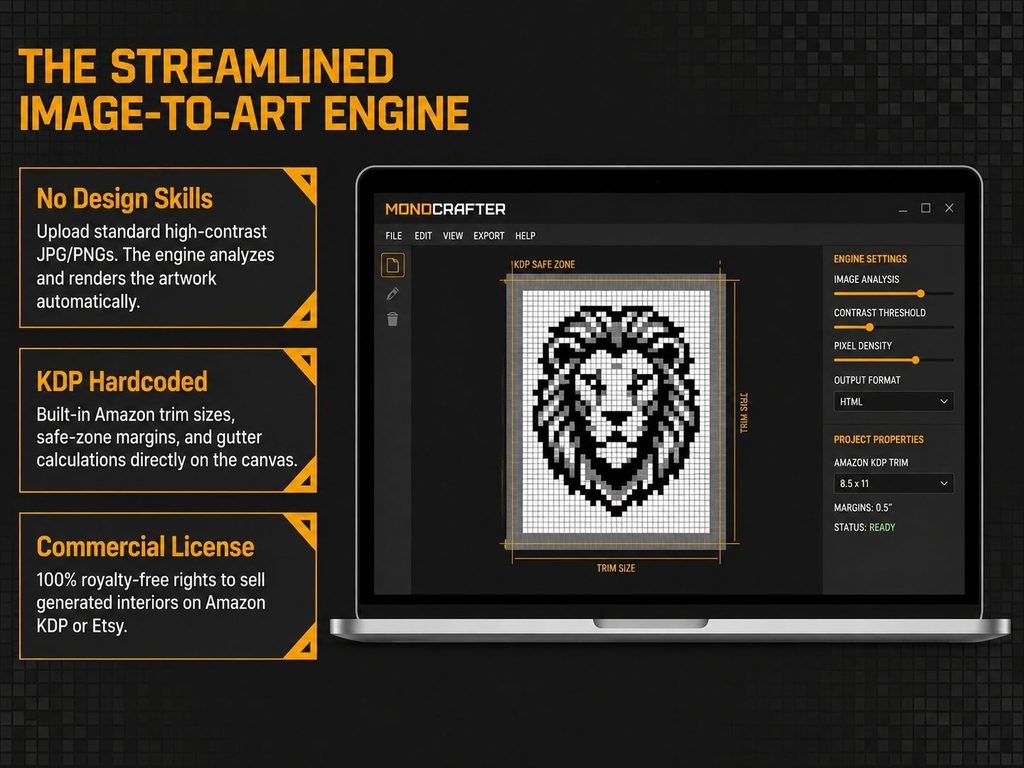
No API keys, no design software, and no monthly fees are needed clearly and consistently stated on both pages. In this KDP Monocrafter Review, these features help make the entry-level offering more approachable for beginners by reducing the technical hurdles between uploading an image and creating a finished design. The research bonuses included also offer some practical benefit to publishers seeking assistance in selecting ideas and identifying audiences. The sales page lists the package’s total value as $737, compared to its $ 17 launch price. Like all vendor value stacks featured on this site, view this as marketing framing the individual components are genuine and clearly outlined, but the dollar amounts assigned to each aren’t standalone appraisals.
In this KDP Monocrafter Review, the best way to evaluate the product is by considering which features you’d actually find useful and whether they genuinely save you significant time compared to producing similar artwork by hand. The low entry price simplifies testing, but the true value depends on your publishing objectives and how much of the included features you require. If your main goal is a straightforward method to experiment with monochrome artwork, the front end should suffice; however, users working on larger book projects should carefully review the upgrade options and page-generation limits before proceeding.
How To Actually Use This (Step-By-Step)
- Step 1 — Upload a source image (2–5 minutes): JPG or PNG; the sales page notes high-contrast images produce the strongest results.
- Step 2 — Adjust brightness, contrast, smoothing, and dithering (10–15 minutes): Use the sliders to bring out detail before rendering, especially if your source image isn’t already high-contrast.
- Step 3 — Choose Shapes or Pixels mode and set grid density (5–10 minutes): Try both modes on the same image before committing, since they produce meaningfully different visual results.
- Step 4 — Build out your page(s) in the BookFlow workspace: Time varies — see the flagged discrepancy above regarding page limits at the front-end tier.
- Step 5 — Preview against KDP’s trim size and margin guides directly on the canvas (10 minutes): Confirm your specific book size before exporting.
- Step 6 — Export your PDF and upload to KDP (20–30 minutes): Exporting is described as one click; setting up your actual KDP listing remains a separate step on Amazon’s side.
Who This Is NOT For
- Anyone who needs a confirmed answer on multi-page book generation before buying: Get this in writing from the vendor first, given the direct contradiction found in this research.
- Anyone who wants a fully verified creator track record before purchasing: None could be independently confirmed here.
- Anyone expecting deep, Photoshop-level vector editing: The sales page itself notes this isn’t included.
- Anyone who searched for outside reviews and found the top10reviewpoint.com result: That content is fabricated and shouldn’t factor into your decision.
Pros And Cons
- Specific, well-differentiated concept — a real niche angle (monochrome/pixel-reveal books) rather than generic AI hype
- No subscriptions, no API keys, no design software required — all stated consistently across both pages
- Clear commercial license and 30-day refund policy
- Niche demand claims backed by specific, checkable-in-principle figures rather than vague assertions
- A confirmed fake “review” of this product was identified and excluded, protecting this article’s own credibility
- Sales page and JV page directly contradict each other on whether the $17 tier builds multi-page books
- No independently verifiable creator track record found
- Niche/market claims rest on vendor-provided screenshots, not independently verified
- Full funnel runs to roughly $537 if every upsell is taken, a long way from the $17 headline
- A fabricated third-party review of this exact product exists online and could mislead buyers researching outside this site
How This Compares To The Alternatives
| Approach | Cost | Time to First Page |
|---|---|---|
| Manual Photoshop/Illustrator workflow | $10–$55/month (Adobe) | Hours per page |
| Free online pixel-art converters | $0 | Minutes |
| Hiring a designer for monogram/pattern book interiors | $200–$1,000+ per book | Days to weeks |
| KDP Monocrafter | $17 (+optional upsells) | Minutes per page, per the sales page’s own claim |
Pre-Purchase Checklist
- Confirm directly with the vendor whether the $17 front end supports multi-page book generation or single pages only: The sales page and JV page disagree.
- Don’t rely on top10reviewpoint.com’s coverage of this product: It’s fabricated and factually incorrect.
- Decide whether the OTO 1 upgrade (multi-page, more shapes, cover creator) is worth it: Base this decision on the answer to the question above.
- Review the linked standard refund policy for exact terms: Do this before purchasing.
- Test the tool on one image and one page before committing to a full book project.
Frequently Asked Questions – KDP Monocrafter Review
Can the $17 version build a full multi-page book?
Unclear — the sales page’s FAQ says the front end is single-page only, with multi-page generation as an upgrade, but the JV page describes the same $17 tier as including up to 20 pages. This review couldn’t resolve the contradiction and recommends confirming directly with the vendor before buying if this matters to your plan.
Do I need design skills or software like Photoshop?
No — the sales page states the tool is built for beginners with no design software or technical setup required.
Is there a subscription or ongoing fee?
No — both the sales page and JV page describe this as a one-time payment with no monthly fees at the front-end tier.
Can I sell the books I create?
Yes — a full commercial license is stated as included, allowing sale on KDP, Etsy, or elsewhere with 100% of profits kept.
Is there a review of this product worth reading elsewhere?
Be cautious of one specific result — top10reviewpoint.com published a “review” claiming 48 hours of hands-on testing before this product’s own listed launch date, and misdescribes it as a free, cover-only tool. That content was excluded from this review as fabricated.
Who’s behind KDP Monocrafter?
Owen Bennet, operating as KoJi Academy / KoJi Launch. No independently verifiable prior track record was found for this specific vendor.
Get These 6 Bonuses When You Buy Through My Link
I’ve added these extra bonuses to help you get more value from your purchase and move faster with promotion, automation, traffic, and sales.

DFY Social
A done-for-you social media bonus created to help you promote offers faster without starting from a blank page.

Quantum AI
A powerful AI-focused bonus designed to help you improve productivity, create faster, and simplify your online workflow.

Anonymous AI
Learn how to build and promote online using AI without needing to show your face or become a personal brand.

Video Marketing Profits
A practical bonus focused on using simple videos to attract attention, build trust, and drive more clicks to your offers.

High Ticket AI
This bonus helps you understand how AI can be used around premium offers, positioning, and higher commission opportunities.
Traffic Funnel Blueprint
A simple funnel blueprint to help you understand how to move visitors from traffic sources toward your affiliate offer.