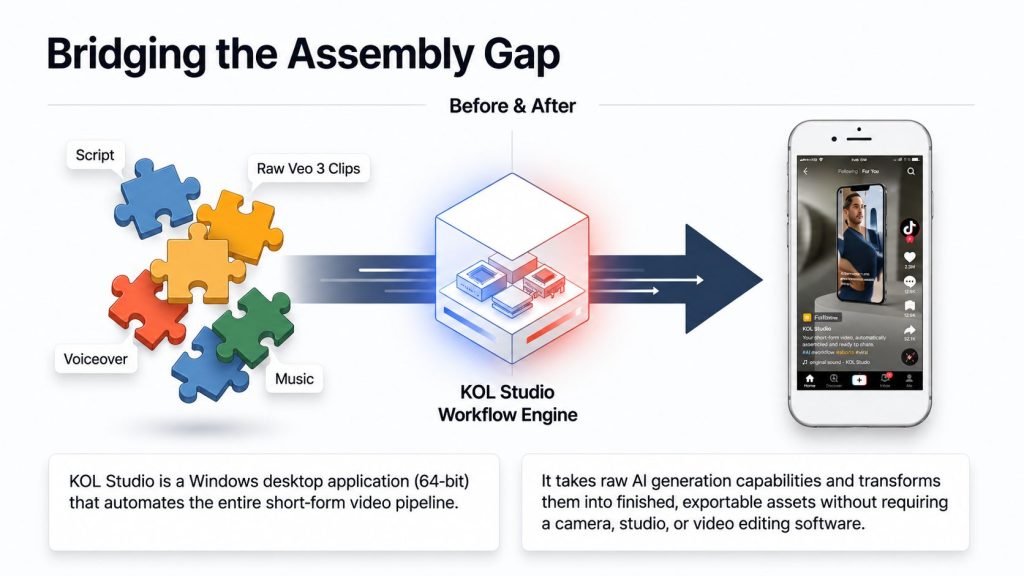
Most AI video tools hit a similar bottleneck: they can produce a brief clip or one eye-catching image, but converting that into a fully voiced, scored, ready-to-post video still requires manual editing. KOL Studio is designed specifically to bridge that gap, leveraging Google’s Veo 3 model as its core generation engine and automating all surrounding tasks including scripting, character consistency, voiceover, music, and final export. In this KOL Studio AI Video Creator Powered by Google Veo 3 Review, I examine how this automated workflow stacks up against the traditional, step-by -step approach to creating AI videos.
I reviewed the entire sales page in depth covering the workflow, actual costs ( including what’s not covered by the $17 price), the template system, and the guarantee to clearly explain exactly what you’re purchasing and what additional fees you’ll still need to pay. This KOL Studio AI Video Creator Powered by Google Veo 3 Review is crafted to help you better understand the real value of the software before deciding whether it should be part of your content workflow.
Quick Summary Table
| Category | Details |
|---|---|
| Product Name | KOL Studio AI Video Creator |
| Creator | AutoVeos |
| Platform | Windows 10/11 (64-bit) desktop app only |
| Core Engine | Google Veo 3 (external, user-provided account required) |
| Templates Included | 3 of 50+ (Starter license), chosen after purchase |
| Output | 9:16 or 16:9, up to 1080p, MP4 |
| Price | $17 one-time (marked down from $97) |
| Access Period | 12 months, 1 PC (Starter license) |
| Guarantee | 30-day money-back, “no questions asked” |
| Required Extras | Google AI Pro/Ultra subscription + OpenRouter or Gemini API (paid separately) |
KOL Studio + $1,000+ Exclusive Bonuses
Get KOL Studio and receive my exclusive bonus package valued at over $1,000 to help you make the most of your AI-powered video creation workflow.
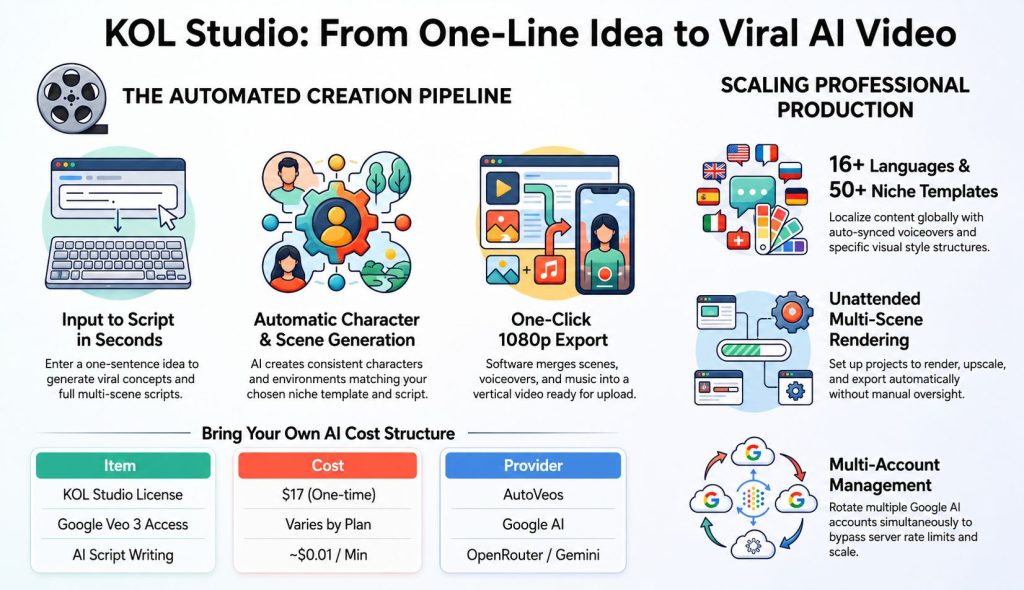
Table of Contents
What Is KOL Studio?
KOL Studio is a Windows desktop app by AutoVeos designed to automate the production of full short-form videos for TikTok, Instagram Reels, and YouTube Shorts. Instead of producing just one clip or image, as many AI video tools do, it handles the entire workflow: coming up with a content concept, drafting a complete multi-scene script, generating each scene using Google’s Veo 3 model, incorporating AI-generated voiceover and background music, and assembling everything into a single, export-ready final video. In this KOL Studio AI Video Creator Powered by Google Veo 3 Review, I’m evaluating how well this all-in -one workflow streamlines the creation of short-form videos.
Before purchasing, it’s important to understand that KOL Studio is essentially a software license for the workflow, not a license for AI generation itself. Google Veo 3, the model responsible for generating videos, demands its own standalone Google AI Pro or Ultra subscription. While KOL Studio links to this subscription, it does not cover or manage its pricing. That distinction matters in this KOL Studio AI Video Creator Powered by Google Veo 3 Review, since the $ 17 software price represents just one component of the total cost to use the system.
Who Created It?
KOL Studio was created by AutoVeos. The sales page features direct links to the Privacy Policy, Terms of Service, Contact Support, and a separate Refund Policy page, plus an active YouTube channel ( KOL Studio Official) that showcases demo videos created using the software. In this KOL Studio AI Video Creator Powered by Google Veo 3 Review, these resources offer buyers extra ways to confirm the product, evaluate its policies, and view examples of the kind of content the software is intended to generate.
How Does It Work? (The 7 Steps)
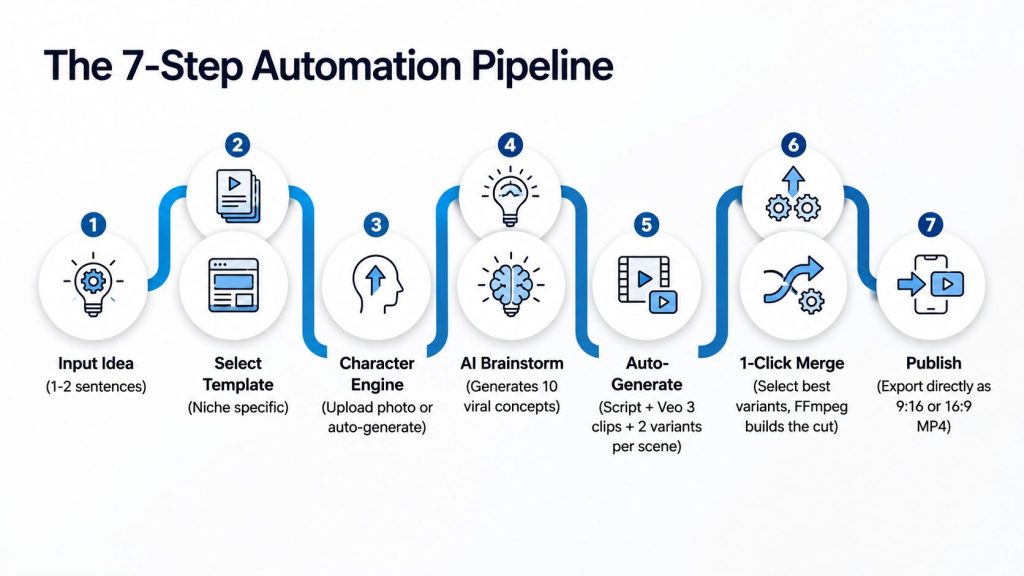
Enter Your Idea — describe the video in one or two sentences
Select Template — choose from your 3 included templates (or more with an upgrade)
Upload or Auto-Generate — provide a photo of your character/product, or let the AI create one from scratch
AI Brainstorm — receive 10 viral content concepts to choose from or combine
Generate — the AI writes the full script and generates every scene with 2 variants each, automatically
Select & Merge — pick your favorite variant per scene, then merge into a complete video in one click
Publish — export in the correct format and upload directly to TikTok, Reels, or Shorts
What’s Inside the Starter License
| Feature | Details |
|---|---|
| AI Brainstorm | 10 niche-optimized content ideas from a one-line prompt |
| Auto Character Generation | Consistent AI character from an uploaded photo or generated from scratch |
| Full Scene Script | Multi-scene script with camera angles, dialogue, lighting, transitions |
| Video Generation | Google Veo 3, 8-second clips per scene, up to 1080p, 2 variants per scene |
| Voiceover & Music | AI voiceover in 16+ languages, auto-synced background music |
| Video Merge | 1-click FFmpeg-based merge of selected scene variants |
| Export Formats | 9:16 (TikTok/Reels/Shorts) or 16:9 (landscape) |
| Multi-Account Management | Rotate multiple Google AI accounts to bypass rate limits |
| Unattended Rendering | Set up a project once; it renders, upscales, and exports on its own |
| Templates | Choice of any 3 from 50+, selected after purchase |
| Access | 12 months, 1 PC, free updates included |
The 50+ Niche Templates
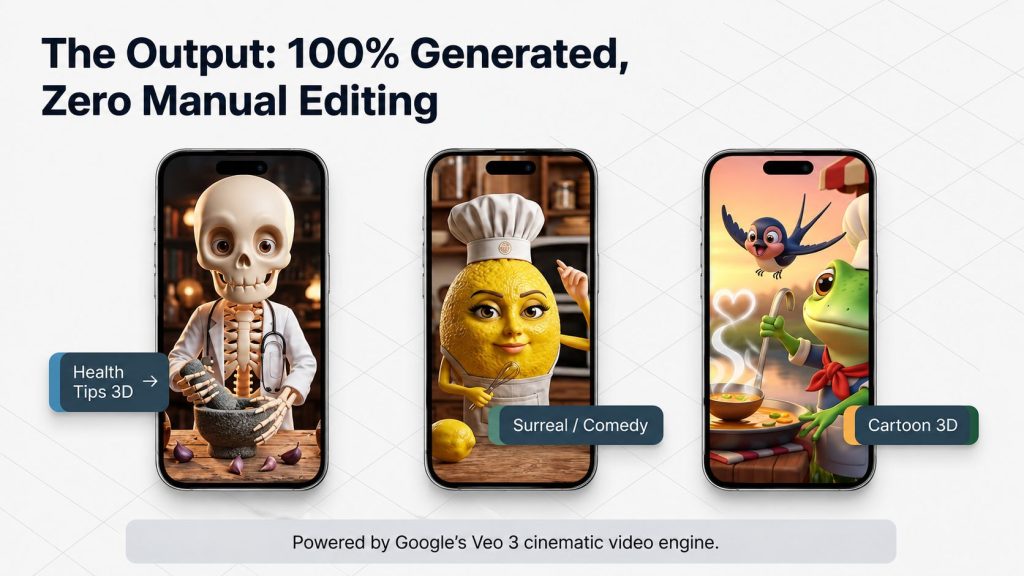
Each template is said to possess its own visual language, character type, camera style, and content structure. The catalog covers a broad spectrum of content genres, such as Standard Sales, KOL Daily Life, Insurance Drama, Health Cartoon, Health Tips 3D, Cartoon 3D, Product Review, Rural Lifestyle, Countryside, Outdoor Adventure, Music Video, Loop Video, Restoration, Frozen Survival, Sci-Fi Action, Horror, Historical, Comedy, and Romancewith more templates slated for release. In this KOL Studio AI Video Creator Powered by Google Veo 3 Review, this tool stands out for offering creators multiple formats to experiment with across various short-form content niches.
With the Starter license, you can pick any three of these templates after buying; to access ten templates or the full 50+ library, you’ll need to upgrade. For this KOL Studio AI Video Creator Powered by Google Veo 3 Review, you should keep that limitation in mind if you intend to launch multiple channels or test various niches, as the Starter tier might prove limiting for producing large volumes of content.
Benefits
- Complete Content Pipeline: Automates the entire content creation process, including idea generation, script creation, video generation, voiceover, music, and final merging instead of requiring separate tools for each step.
- No Filming or Manual Editing: You don’t need a camera, studio, filming setup, or manual video editing software, making the workflow much easier for users who want to produce content without traditional production equipment.
- Built for High-Volume Production: Multi-account management and unattended rendering allow users to scale their production workflow. Testimonials claim that some users can produce 10–20+ videos per day, although actual output will depend on the setup and external AI services used.
- Transparent External AI Costs: The offer provides an itemized breakdown of the external AI account costs required to operate the system, giving buyers a clearer picture of the additional expenses instead of discovering them unexpectedly after purchase.
- One-Time $17 License: The software is offered for a one-time $17 payment that provides 12 months of access, with free updates included during the access period.
Pros and Cons
| Pros | Cons |
|---|---|
| Full pipeline automation, not just clip generation | $17 price does not include required Veo 3/AI account costs |
| Clear, specific 30-day money-back guarantee | Windows only — no Mac support currently |
| Uses Google Veo 3, a genuinely advanced video model | Only 3 of 50+ templates included on the Starter license |
| Multi-account rotation addresses real rate-limit issues | Output volume depends on your own Google AI plan/quota |
| Transparent cost disclosure for external accounts | Exact PRO/Agency/Lifetime feature splits are inferred, not fully confirmed |
Who Should Buy It?
- Short-Form Content Creators: TikTok, Reels, and YouTube Shorts creators who want to maintain a consistent publishing schedule without filming themselves.
- Small Marketing Agencies: Agencies looking to streamline video production, reduce repetitive manual work, or potentially handle more client content without maintaining a large video production team.
- Freelance Video Producers: Freelancers who want to increase their production capacity by using largely unattended AI rendering instead of completing every video manually.
- Faceless Content Creators: Creators building faceless channels across different markets who can take advantage of the 50+ supported niche templates to produce content more efficiently.
- Windows-Based AI Users: Windows users who are already comfortable managing separate AI provider accounts and want to connect those services to a more automated video production workflow.
Who Should Avoid It?
- Mac Users: The software is currently designed for Windows 10/11 (64-bit), so Mac users may not be able to run it natively on their systems.
- Buyers Expecting Only a $17 Cost: The $17 license is not necessarily the complete operating cost. Access to services such as Google Veo 3 through Google AI Pro or Ultra can involve separate ongoing expenses.
- Users Wanting One All-Inclusive Subscription: This setup may not be ideal for buyers who prefer a single subscription because the workflow can involve managing multiple connected accounts, including KOL Studio, Google AI, and OpenRouter/Gemini.
- Buyers Needing All Templates Immediately: Anyone expecting instant access to the complete 50+ template library should note that the Starter license includes only 3 templates, with broader access requiring an upgrade.
Pricing Breakdown — The Real Total Cost
| Product | Price |
|---|---|
| Front End — KOL Studio AI Video Creator for KOLs & Affiliates | $17.00 |
| KOL Studio PRO — 10 Templates + Multi-Device | $37.00 |
| KOL Studio AGENCY — All 50+ Templates + 5 Devices + Team | $97.00 |
| KOL Studio LIFETIME — All Templates + Lifetime Access | $147.00 |
KOL Studio + $1,000+ Exclusive Bonuses
Get KOL Studio and receive my exclusive bonus package valued at over $1,000 to help you make the most of your AI-powered video creation workflow.
🎁 Bonuses Just For You
1. DFY Social
Get ready-made social media content, graphics, and posting ideas that help you promote your business consistently without spending hours creating posts from scratch.
2. Quantum AI
Discover AI-powered tools and workflows that can speed up content creation, marketing tasks, and business automation while saving valuable time.
3. Anonymous AI
Learn how to build and grow an online business using AI without showing your face, making it ideal for creators who prefer to stay behind the scenes.
4. Video Marketing Profits
Master simple video marketing strategies to increase traffic, engage your audience, and generate more sales across platforms like YouTube and social media.
5. High Ticket AI
Explore AI-assisted methods for promoting premium products and services, helping you target higher-value customers and maximize your earning potential.
6. Traffic Funnel Blueprint
Follow a proven step-by-step funnel strategy to attract visitors, capture leads, and convert them into paying customers with greater efficiency.
The front end is listed at $17, marked down from a stated regular price of $97 (“Launch Special”), as a one-time payment covering 12 months of access, 3 chosen templates, and use on 1 PC. The sales page states pricing returns permanently to $97 once the countdown timer expires.
Critically, this is not the full cost of using the software. KOL Studio requires two separate, user-provided AI accounts:
| Item | Cost | Paid To |
|---|---|---|
| KOL Studio License (one-time) | $17 | AutoVeos |
| Google AI Pro or Ultra (for Veo 3 video generation) | Set by Google — check current pricing at one.google.com | |
| AI Script Writing (OpenRouter or Gemini API) | ~$0.01 per minute of video | OpenRouter or Google |
The sales page is upfront about this structure, stating directly that KOL Studio itself has “zero per-video fees” and that generation costs depend entirely on the user’s own Google AI plan and API usage, paid directly to those providers rather than marked up by KOL Studio.
OTO Breakdown
Per the WarriorPlus affiliate offer, three upsells follow the front end:
- KOL Studio PRO — 10 Templates + Multi-Device ($37): Based on the FAQ language on the front-end page, this upgrade likely expands access from 3 Starter templates to 10 templates and removes the single-PC restriction.
- KOL Studio AGENCY — All 50+ Templates + 5 Devices + Team ($97): This tier likely unlocks the complete 50+ template catalog, supports up to 5 devices, and adds team-oriented functionality for agencies managing multiple clients or staff members.
- KOL Studio LIFETIME — All Templates + Lifetime Access ($147): This upgrade likely removes the standard 12-month access window and provides permanent access to the available templates without requiring annual renewal.
(This mapping is inferred from direct FAQ language on the front-end sales page — “you’ll have the option to unlock 10 more (Pro Pack) or all 50+ templates (Agency)” — but wasn’t independently confirmed against each OTO’s own sales page. Verify exact feature lists before writing dedicated OTO copy.)
The 30-Day Money-Back Guarantee
KOL Studio supports its front-end purchase with a clearly stated 30-day guarantee: “ Try KOL Studio for 30 full days. Create videos. Check each feature. If you ’re not fully impressed by the quality and speed of your AI videos, simply email us and we’ll refund every penny no questions asked, no hassle. In this KOL Studio AI Video Creator Powered by Google Veo 3 Review, the 30-day trial period offers users a fair chance to evaluate the software and see if its workflow and output quality align with their needs.
Buyers can also access a dedicated refund policy page, linked directly from the footer of the sales page, to review the full terms before making a purchase. That added transparency is worth highlighting in this KOL Studio AI Video Creator Powered by Google Veo 3 Review, especially since the software includes separate external AI service fees that users should be aware of before adopting the workflow.
Real Use Case Examples
Based on the testimonials and audience segments described on the sales page:
- TikTok Creator: Uses the Health Tips 3D template to produce a batch of videos each week, focusing on a specific format that has reportedly delivered strong performance. This KOL Studio AI Video Creator Powered by Google Veo 3 Review highlights how niche-specific templates can help creators maintain a consistent publishing workflow.
- Small Marketing Agency: Uses KOL Studio as an alternative to maintaining an in-house video production team, producing around 20 videos per week for multiple clients with templates such as Cartoon 3D and Product Review. This KOL Studio AI Video Creator Powered by Google Veo 3 Review shows how the software could help agencies increase production volume while reducing repetitive manual work.
- Freelance Video Producer: Takes advantage of multi-account management to queue rendering jobs overnight, allowing the producer to review completed videos the following morning instead of monitoring the process manually. In this KOL Studio AI Video Creator Powered by Google Veo 3 Review, unattended rendering stands out as a potentially useful feature for freelancers handling multiple projects.
- Faceless Content Creator: Selects three templates that match a specific niche, such as Rural Lifestyle, Outdoor Adventure, or Restoration, and uses them to build a consistent themed content channel. This KOL Studio AI Video Creator Powered by Google Veo 3 Review shows how focusing on a small set of complementary templates could help maintain a recognizable content style.
KOL Studio vs. Alternatives
| Factor | KOL Studio | Freelance Videographer | Generic AI Clip Generators |
|---|---|---|---|
| Cost per Video | Veo 3/API usage only (no KOL Studio fee) | $200–$500 per video | Often subscription-based |
| Filming Required | No | Yes | No |
| Full Video (Script + VO + Music) | Yes, automated end-to-end | Yes, manual | No — usually just raw clips |
| Unattended/Batch Production | Yes, multi-account rendering | No | Varies |
| Platform | Windows only | N/A | Usually web-based, cross-platform |
| Pricing Model | $17 one-time + external AI account costs | Per-video fee | Monthly subscription |
KOL Studio + $1,000+ Exclusive Bonuses
Get KOL Studio and receive my exclusive bonus package valued at over $1,000 to help you make the most of your AI-powered video creation workflow.
Frequently Asked Questions – KOL Studio AI Video Creator Powered by Google Veo 3 Review
1. What exactly is KOL Studio?
It’s a Windows desktop app that automates the creation of complete short-form videos — script, AI-generated scenes via Google Veo 3, voiceover, music, and merging — from a one-line idea, without filming or manual editing.
2. Do I need video editing skills?
No. The software automates script writing, video generation, voiceover, music, and merging — the sales page states if you can type and click, you can use it.
3. How long does each video take to create?
Approximately 15–30 minutes for a complete short video, depending on internet speed and AI server load — no manual input needed during that time.
4. How many videos can I create?
Unlimited from KOL Studio’s side; the only limit is your own Google AI account quota. Many users reportedly generate 10–20 videos per day using multi-account mode.
5. What languages are supported for voiceover?
16+ languages, including English, Vietnamese, Chinese, Japanese, Korean, French, Spanish, Italian, German, Portuguese, Russian, Arabic, Hindi, Bengali, Indonesian/Malay, and Thai.
6. Does it work on Mac?
No, currently Windows 10/11 (64-bit) only. A Mac version is on the development roadmap but not yet available.
7. Can I add more templates later?
Yes. The Starter license includes 3 templates chosen after purchase, with the option to unlock 10 templates (PRO) or the full 50+ catalog (AGENCY) via upgrades available after checkout.
8. Is this a one-time payment?
Yes for the license itself — $17 covers 12 months of access with 3 templates and no recurring KOL Studio charges. After 12 months, users can renew or upgrade to the Lifetime tier. Note this is separate from the ongoing Google AI/API costs, which are paid directly to those providers.
9. How much does each video actually cost to generate?
KOL Studio charges zero per-video fees. Costs depend entirely on the user’s own Google AI plan (for Veo 3) and API usage (for script writing, roughly $0.01 per minute of video), paid directly to those providers with no markup from KOL Studio.
10. What is the refund policy?
A 30-day money-back guarantee applies — the sales page states refunds are issued in full via email request, described as “no questions asked, no hassle,” with a dedicated refund policy page linked for complete terms.
Get These 6 Bonuses When You Buy Through My Link
I’ve added these extra bonuses to help you get more value from your purchase and move faster with promotion, automation, traffic, and sales.
DFY Social
A done-for-you social media bonus created to help you promote offers faster without starting from a blank page.
Quantum AI
A powerful AI-focused bonus designed to help you improve productivity, create faster, and simplify your online workflow.
Anonymous AI
Learn how to build and promote online using AI without needing to show your face or become a personal brand.

Video Marketing Profits
A practical bonus focused on using simple videos to attract attention, build trust, and drive more clicks to your offers.

High Ticket AI
This bonus helps you understand how AI can be used around premium offers, positioning, and higher commission opportunities.
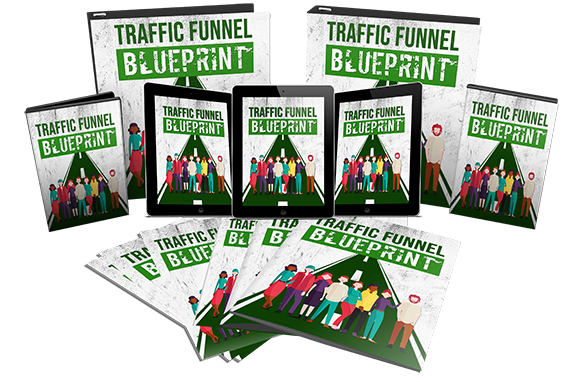
Traffic Funnel Blueprint
A simple funnel blueprint to help you understand how to move visitors from traffic sources toward your affiliate offer.